Fraud Prevention
How to Stop Fake Signups: Fake Account Detection by IP Type
Stop fake signups by IP type: seven live lookups from 2 November 2026, the signup action each one gets, and /24 and /64 velocity limits for your own code.

Okta Threat Intelligence described an AI video service whose free trial drew a flood of fake signup attempts. In one customer's logs, "Between June 1, 2026, and July 1, 2026, logs show over 105,000 brute force attempts to sign up from 251 distinct IPs likely connected to bots." The registrations "were tied to proxy providers and VPNs". By GeoIPHub's arithmetic on Okta's numbers, that is about 418 attempts per address over the month, or about 14 a day, so a limit of a few signups per IP per hour may never fire.
The hard part is that fake signups and real customers share the same networks. Real people use VPNs and cloud desktops too, and the addresses real people share, such as iCloud Private Relay, mobile carriers and carrier-grade NAT, look busy by nature. A rule that only blocks will either let the pool in or lock customers out.
Below: seven addresses a signup can come from, what GeoIPHub's IP lookup API returned for each on 2 November 2026 and what we'd do at the form, why shared addresses must never be refused on score alone, velocity limits with tested code, and what the IP can't see.
What fake account detection checks at signup, and the one signal you always have
Fake account detection scores each new signup across network, velocity, email, phone, device and behaviour. At the moment the form posts, the IP is the only one of those your server always has without asking the user for anything, which is why an IP fraud score is the usual first check.
OWASP names the attack OAT-019 Account Creation: "Bulk account creation, and sometimes profile population, by using the application’s account sign-up processes." Fake account creation is rarely the goal; it is the setup for promo and referral farming, for one operator behind many accounts evading a ban, or for staging credential-stuffing runs.
Signup fraud is common enough to plan for. Okta's Customer Identity Trends Report 2025, drawn from its Auth0 platform, says: "In 2024, an average of 46% of all registration attempts across the Auth0 platform were identified as signup attacks." Stripe, announcing Sessions 2026 on 29 April 2026, put its own network's figure this way: "Across AI services running on Stripe, one in six attempted sign-ups is made by a bad actor."
Here is what each layer needs, and which ones an IP lookup can answer:
| Layer | Examples | Can an IP lookup see it? |
|---|---|---|
| Network | Tor exit, VPN server, cloud server, relay, mobile carrier | Yes |
| Velocity | Signups per address, prefix or network in an hour or a day | Only the keys; the counting is your code |
| Disposable domains, plus-address and dot variants | No | |
| Phone | VoIP numbers, recycled numbers | No |
| Device | Browser and hardware traits that repeat across accounts | No; see device fingerprinting |
| Behaviour | Form fill speed, copy and paste, mouse movement | No |
The device row is a different tool; our comparison of device fingerprinting and IP data covers how the two combine.
Seven signup IPs, seven decisions: what GeoIPHub returned on 2 November 2026
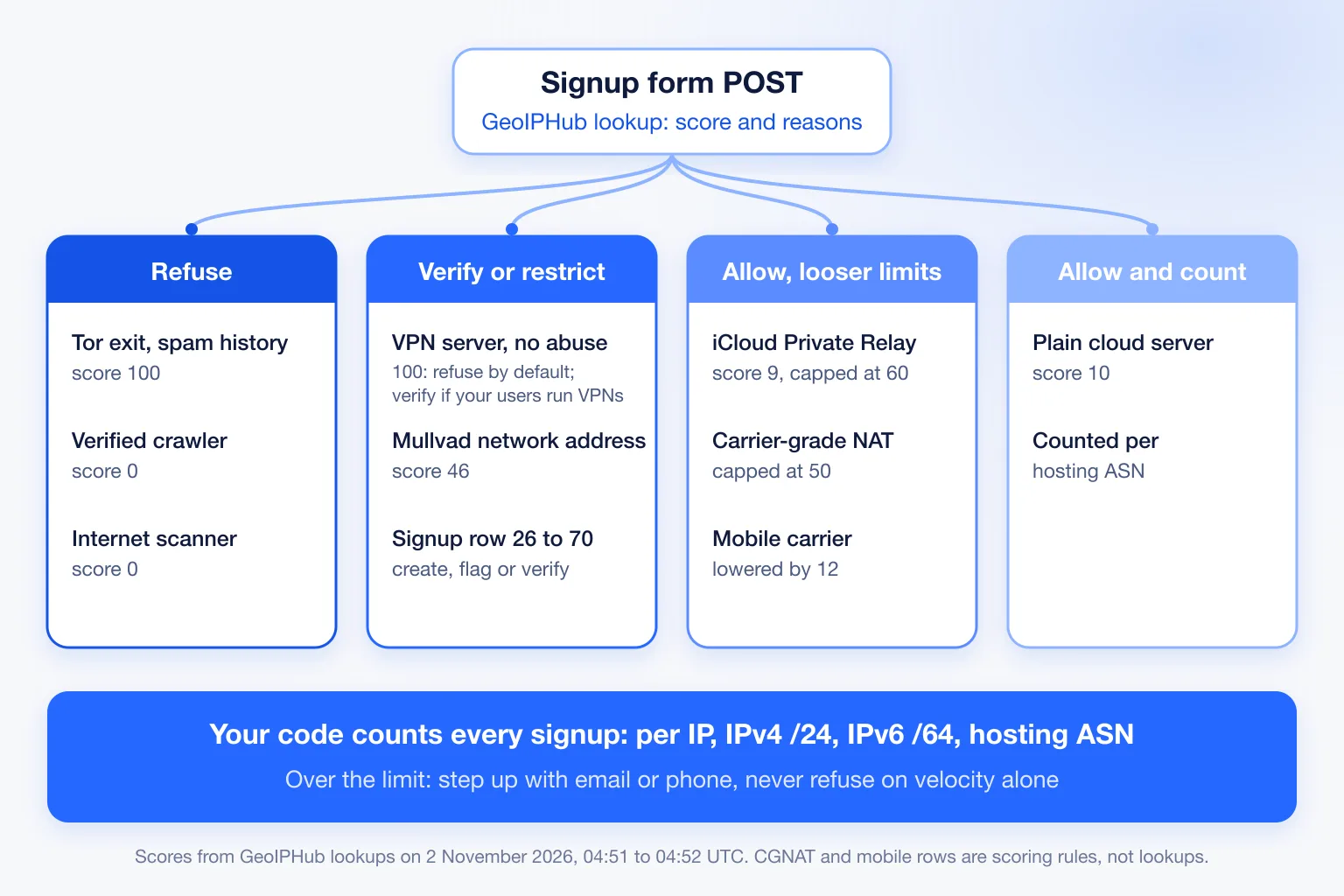
GeoIPHub looked up seven addresses a signup can come from between 04:51 and 04:52 UTC on 2 November 2026. Here is the score, the reasons and what we'd do at the form, using the signup row of GeoIPHub's starting fraud score thresholds. The last two rows are rules from our scoring configuration, not lookups.
| Address | What it is | Score, action | detection_methods | At signup |
|---|---|---|---|---|
| 185.220.101.1 | Tor exit, also on zen.spamhaus.org | 100, block | tor_exit, datacenter_blocklisted, no_ptr_datacenter, known_spammer | Refuse |
| 185.213.155.73 | VPN server; vpn_provider names Mullvad | 100, block | known_vpn_server, wireguard_open, datacenter_with_vpn_proxy, no_ptr_datacenter | Refuse by default; verify instead if your users run VPNs and no abuse reason fired |
| 45.83.220.7 | Mullvad VPN network address, vpn_provider "Mullvad (31173 Services)" | 46, review | known_vpn_server, datacenter_ip | Create, restrict, flag |
| 45.33.32.156 | scanme.nmap.org, a Linode cloud server | 10, allow | datacenter_ip | Allow; count per hosting network |
| 104.28.46.99 | iCloud Private Relay egress | 9, allow | relay_ip | Allow; looser velocity limits |
| 66.249.66.1 | Verified Googlebot (crawler.operator Google) | 0, allow | datacenter_ip, verified_crawler | No account: a crawler doesn't sign up |
| 162.142.125.10 | Censys internet scanner (is_scanner true) | 0, allow | No reasons returned | No account |
| Any CGNAT address | Rule from our scoring configuration, not a lookup | Capped at 50 | The cap lifts only with the address's own VPN, proxy, Tor, protocol, botnet or abuse evidence | Never refuse on score |
| Any mobile carrier address | Rule from our scoring configuration, not a lookup | Lowered by 12 | mobile_carrier, when there is no threat evidence | Never refuse on score |
The two 100s look identical and are not. The Tor exit carries spam history; the VPN server carries only anonymity reasons, with no abuse evidence at all. That difference decides whether a VPN signup is refused or verified.
The API's own recommended_action blocks only above 75. GeoIPHub's starting signup thresholds block from 71, and no row on 2 November 2026 fell between the two lines.
Home broadband has no row, because we don't publish household addresses. GeoIPHub's scoring gives a home line its discount only when the address has a residential-pattern reverse DNS name, so a home line without one gets no residential discount, and any threat reason counts in full.
Read the reasons, not the number: one signup traced end to end
The score says how risky an address is; scoring.detection_methods says why, and the why decides between restricting, verifying and refusing. Here is the trimmed response for 45.83.220.7, looked up at 04:51:58 UTC on 2 November 2026:
{
  "ip": "45.83.220.7",
  "asn": {
    "asn": 39351,
    "org": "ESAB-AS - 31173 Services AB",
    "connection_type": "datacenter"
  },
  "detection": {
    "is_vpn": true,
    "is_hosting": true,
    "is_relay": false,
    "is_mobile": false,
    "vpn_provider": "Mullvad (31173 Services)"
  },
  "threat": { "is_cgnat": false },
  "scoring": {
    "fraud_score": 46,
    "recommended_action": "review",
    "detection_methods": ["known_vpn_server", "datacenter_ip"]
  }
}
Two reasons fired. known_vpn_server adds 36 (40 points at 0.9 confidence) and datacenter_ip adds 10 (20 at 0.5), so the score is 46. That lands in the 26 to 50 band of GeoIPHub's starting signup thresholds: create and flag. We'd create the account in a restricted state, with no trial credits or bonus until the email is confirmed. Because detection.is_hosting is true, the signup also counts against AS39351 in the velocity check below. At the first value event, such as a trial start or a credit grant, look the IP up again.
The Mullvad server at 185.213.155.73 scored 100 block, and every one of its four reasons is about anonymity, not abuse. The default at signup is to refuse it. Products whose real users run VPNs can write rules on reasons and send a 100 like this one, with anonymity reasons and no abuse reason, to email or phone verification instead. A VPN alone is a privacy choice, and the people it protects are often who gets wrongly flagged. A Tor exit with spam history stays refused either way.
A score of 0 is not a pass: crawlers and scanners on your signup form
The two friendliest results in GeoIPHub's 2 November 2026 lookups, verified Googlebot at 66.249.66.1 and the Censys scanner at 162.142.125.10, both scored 0 allow, and they are the two that should never create an account. That surprised us more than any 100 did.
GeoIPHub's verified_crawler reason subtracts 28.5, so a verified crawler lands at the bottom of the scale. That is right for crawling and wrong for a form POST. If threat.crawler.verified is true on a signup request, don't create the account. Read crawler.verified and crawler.operator for this, never crawler.name.
threat.is_scanner doesn't feed the score at all: the Censys address returned no reasons. Check the flag directly, and refuse the signup when it is true.
Never refuse a shared address on score alone: relays, CGNAT and mobile
An iCloud Private Relay egress, a carrier-grade NAT address or a mobile gateway can carry many real people. GeoIPHub's scoring caps relay addresses at 60 and CGNAT addresses at 50 unless the address carries its own threat evidence, and discounts clean mobile addresses, while a mobile address with threat evidence gets a penalty instead. Your rules should keep these addresses out of the block band unless they carry their own evidence.
In GeoIPHub's scoring, relay_ip adds 8.5 and there is no relay discount, so our relay sample scored 9. The CGNAT cap lifts only with the address's own VPN, proxy, Tor, protocol, botnet or abuse evidence. Mobile carrier addresses get mobile_carrier, which lowers the score by 12 when there is no threat evidence.
None of this means "trust". It means the IP alone can't separate the one bad actor from the many customers behind the same address. So challenge these signups, never refuse them on score, and give them ten times the usual velocity limits. For Private Relay specifically, the advice is to let them through and score the session on what the account does next.
Count signups per IP, /24, IPv6 /64 and hosting network in your own code
GeoIPHub's API scores one address; it does not count how many accounts that address, its /24, its /64 or its network made in the last 24 hours. That counter lives in your code, and the lookup tells you which keys to use: asn.asn, detection.is_hosting, detection.is_relay, detection.is_mobile, asn.connection_type and threat.is_cgnat.
In Okta's AI video case, the fake signup attempts averaged about 14 per address per day, spread across 251 addresses. A per-IP counter alone may never trip on that. The prefix and network counters exist for exactly this case.
These are starting points we chose, not industry benchmarks; tune them on your own signups.
| Key | Window | Starting limit | Notes |
|---|---|---|---|
| Exact IPv4 address | 1 hour | 3 | |
| IPv4 /24 | 1 hour | 10 | Catches a pool rotating inside one block |
| IPv6 /64 | 1 hour | 3 | Treat a /64 like one IPv4 address; widen to /56 or /48 when fresh /64s keep arriving from one allocation |
| ASN, hosting only (detection.is_hosting true) | 24 hours | 20 | Real customers rarely sign up from a cloud server |
| Shared addresses (relay, CGNAT or mobile) | Same windows | Ten times the IP and prefix limits | Never block on velocity alone |
Over the limit means step up (email or phone verification, or a CAPTCHA) or restricted creation, not refusal. On IPv6, count the prefix, never the full address, or one actor becomes thousands of "different" signups. Homes commonly get a /56 or /48, which is why the table widens; our guide to rate-limit IPv6 by prefix covers the allocation sizes.
The code below runs on Node 18 or later with no dependencies. It expects the client address as Node reports it, including IPv4-mapped forms such as ::ffff:192.0.2.1, after you take it from your trusted proxy chain. It uses fixed windows, which is a simplification of a sliding window.
// Signup velocity keys: exact IP, IPv4 /24, IPv6 /64, and ASN for hosting.
// Starting limits, not benchmarks. Tune them on your own signups.
import { isIPv4, isIPv6 } from "node:net";

const HOUR = 3600e3, DAY = 24 * HOUR;
const LIMITS = {
  ip:    { window: HOUR, max: 3 },  // one IPv4 address, or one IPv6 /64
  v4_24: { window: HOUR, max: 10 },
  asn:   { window: DAY,  max: 20 }, // hosting networks only
};
const SHARED_FACTOR = 10;           // relay, CGNAT and mobile egress

function expandIPv6(addr) {
  const [head, tail = ""] = addr.toLowerCase().split("::");
  const h = head ? head.split(":") : [];
  const t = tail ? tail.split(":") : [];
  const fill = addr.includes("::") ? 8 - h.length - t.length : 0;
  return [...h, ...Array(fill).fill("0"), ...t].map((g) => g.padStart(4, "0"));
}

export function velocityKeys(ip, lookup) {
  const keys = [];
  const m = ip.match(/^(?:::|(?:0{1,4}:){5})ffff:(\d+\.\d+\.\d+\.\d+)$/i);
  const v4 = m && isIPv4(m[1]) ? m[1] : ip;
  if (isIPv4(v4)) {
    keys.push(["ip", v4], ["v4_24", v4.split(".").slice(0, 3).join(".") + ".0/24"]);
  } else if (isIPv6(ip)) {
    keys.push(["ip", expandIPv6(ip).slice(0, 4).join(":") + "::/64"]);
  }
  const asn = lookup?.asn;
  if (lookup?.detection?.is_hosting && asn?.asn) keys.push(["asn", `AS${asn.asn}`]);
  return keys;
}

const counters = new Map(); // in-memory and unbounded; for a demo only; use Redis INCR + EXPIRE in production

export function checkVelocity(ip, lookup, now = Date.now()) {
  const shared = Boolean(
    lookup?.detection?.is_relay || lookup?.threat?.is_cgnat ||
    lookup?.detection?.is_mobile || lookup?.asn?.connection_type === "mobile");
  const hits = [];
  for (const [level, value] of velocityKeys(ip, lookup)) {
    const { window, max } = LIMITS[level];
    const limit = shared && level !== "asn" ? max * SHARED_FACTOR : max;
    const key = `${level}:${value}:${Math.floor(now / window)}`;
    const count = (counters.get(key) ?? 0) + 1;
    counters.set(key, count);
    if (count > limit) hits.push({ level, value, count, limit });
  }
  return { overLimit: hits.length > 0, hits }; // over the limit: step up, don't block
}
We ran 16 unit tests against this exact code on 2 November 2026 under Node 24.20.0, using documentation and private address ranges plus the scanme.nmap.org address from the table, with no lookups. All 16 passed: IPv4-mapped forms such as ::ffff:45.33.32.156 were keyed as IPv4, rotating through one /64 tripped on the 4th signup, 11 addresses across one /24 tripped only the /24 key, and 30 signups from one relay egress passed while the 31st was flagged. A failed lookup (null) still produces the IP and prefix keys, so the counter keeps working when the API doesn't answer.
Where the IP layer goes blind
An IP lookup can't see a fake account that signs up from a rented home connection or a real phone, and it never sees the email, the device or how the form was filled.
Residential proxies are the clearest gap. GeoIPHub flags proxies we have observed on residential and mobile lines, including addresses a third-party list reports as relaying, but we have no residential proxy detection of our own, and a clean home line can pass. Click farms and device farms running on real SIM cards look like mobile customers, and our scoring deliberately treats mobile customers gently.
GeoIPHub scores the IP; it does not check email addresses or phone numbers. Pair the IP check with your own email checks (disposable domains, plus-address and dot normalisation), phone verification, device signals, and clustering accounts that share keys after signup.
The restricted state is what makes the middle band cheap to run. Create the account, withhold the credits, and release them after verification or the first real action. A fake account that never verifies costs you a database row, not a trial.
How to stop fake signups before the account exists
The whole check is one lookup and one velocity count between "submit" and "create", in this order:
- Take the client IP from your trusted proxy chain, not a raw
X-Forwarded-Forheader, which the client can set to anything. - Look up the IP.
- Refuse Tor exits, verified crawlers and scanners. Refuse a VPN server at 100 by default, or send it to verification if your users run VPNs and no abuse reason fired. Never refuse relay, CGNAT or mobile addresses on score. Apply GeoIPHub's starting signup thresholds to everything else.
- Run the velocity check and step up on a hit.
- If the lookup fails, fall back to the velocity check and email confirmation; don't refuse.
- Store the score, reasons and lookup time with the account, and look the IP up again at the first value event (trial start, credit grant, first payout).
Our tested Node and Python integration shows steps 2 and 3 as working code. GeoIPHub's free tier covers 1,500 lookups a day with every field included.
Paste the last ten IPs from your signup log into the IP fraud score checker and sort them into the table's rows. The score tells you what each address is; the counter tells you how many accounts it has made.
Frequently Asked Questions
How do I stop fake signups without blocking real users?
Look up each signup's IP with GeoIPHub's API before you create the account. Refuse Tor exits and the highest scores, verify the middle by email or phone, and let shared addresses such as iCloud Private Relay, carrier-grade NAT and mobile gateways through with looser velocity limits, because one of those addresses can carry many real customers.
How common is signup fraud?
On Okta's Auth0 platform, an average of 46% of registration attempts in 2024 were identified as signup attacks. Stripe said in April 2026 that one in six attempted sign-ups across AI services on its network is made by a bad actor. Both are vendor figures from their own platforms.
Can an IP address alone detect fake accounts?
No. An IP lookup shows what kind of network the signup came from and why it scored as it did, but it can't see the email, the phone, the device, or a fake account signing up from a rented home connection. Use it as the first layer and pair it with email, phone and device checks.
Does GeoIPHub check email addresses?
No. GeoIPHub's API scores the IP address only. Check email and phone with your own tools and combine those results with GeoIPHub's score and reasons.
Should a VPN user be allowed to sign up?
Often, yes. A VPN on its own is a privacy choice, so you can send VPN signups to email or phone verification instead of refusing them, and keep outright blocks for Tor exits and addresses with spam or abuse history.
How should I rate-limit signups on IPv6?
Count per /64, not per address, because one subscriber can rotate through a whole /64. Widen to the /56 or /48 when new /64s from the same allocation keep arriving, and keep limits looser on mobile carriers.
The team behind the GeoIPHub API
Written by the GeoIPHub team, the people who build the GeoIPHub IP intelligence API and its scanner. Drafts are prepared with AI assistance and edited by the team; API examples are real lookups against the live API unless labelled illustrative.