Fraud Prevention
Google Ads Invalid Click Credits: Refunds, 60 Days, Evidence
Google Ads invalid click credits are billing adjustments, not refunds. Request a review of clicks from the last 60 days with IP facts Google can check.

The spend line climbs, the conversions don't, and every guide says "request a refund". Those guides also state the 60-day rule several different ways, mostly without a source.
Google won't say which clicks it judged, so a request has to stand on facts a Google specialist can check.
Below: Google's pages on credits and refunds (re-read on 11 November 2026), the two 60-day clocks, the list Google asks for, and an evidence pack from six live GeoIPHub lookups, sorted so Google's crawlers come out and shared addresses go in labelled.
Does Google Ads refund invalid clicks? Credits, not refunds
Google Ads doesn't refund invalid clicks: it doesn't bill the ones it catches before the invoice and credits the ones it finds after, and a refund of account credit is a separate process. For what Google's filtering protects and what it doesn't, see our hub.
Google's About invalid traffic page says: "You aren’t charged for invalid traffic detected before billing." Traffic caught before the end of the month "is automatically removed from your billing and campaign reports, so no refunds are necessary."
For the rest: "If invalid traffic is detected after you were billed for it, you'll receive credits in the form of a billing adjustment for the value of the invalid activity." Google issues it automatically "in the next billing cycle, when appropriate and possible".
What most people mean by a Google Ads invalid click refund is this credit. On postpay or monthly invoicing, Google's credits and adjustments page says credits "reduce your account balance"; on prepay they "increase your account balance".
Money back to your card is different. Google's refund page says: "You can request a refund of account credit by canceling your Google Ads account."
Where invalid activity credits show up in your account
Invalid activity credits show up in four places Google's pages name:
- Billing Summary. "You can find invalid traffic credits labeled as “Invalid activity” under the “Adjustments” dropdown in the “Month” card."
- Invoices. For invoicing accounts, "Any new billing setup comes with “Invalid activity credit” line items per campaign by default" (invoice display settings).
- The Overview page. An "Invalid traffic" card shows "Credited cost", but it "is rolling out gradually".
- The Invalid Activity Credit Report. Report Editor, Template gallery, "Invalid Activity Credit Report: Search & PMax". It "is available for Search and Performance Max campaigns" and adds Credited clicks, Credited amount and Adjusted cost.
Credits "won’t retroactively adjust your campaign data in Google Ads", so the Credit Report is the only adjusted view. And the Invalid clicks column (filtered before billing) and your credits "are not directly related". Add the Invalid clicks column to see both.
The two 60-day clocks: when the click happened and when you were invoiced
Google's help page limits investigations to activity in the 60 days before you ask; the Australian version of Google's terms gives a claim period of 60 days after the invoice date. They count from different days.
Clock 1, the help page. Google says it three times:
- "you can submit an invalid traffic investigation request for activity within the last 60 days."
- "Google limits investigations to the past 60 days."
- "Google specialists evaluate your traffic from the last 60 days."
It counts back from your request over click dates and covers investigations only; Google states no time limit for automatic credits.
Clock 2, the terms. The only full Google Ads terms we found on a public Google page are Google's terms for Australia-based customers, changed on 9 November 2023. Section 3(c) defines the Claim Period, in a clause about display impression-count disputes: "If this discrepancy is not resolved, Customer must make a claim within 60 days after the invoice date (“Claim Period”)." Section 8 applies that Claim Period to clicks third parties generate "for prohibited or improper purposes". Those terms also say credits "must be used by Customer within 60 days of issuance".
That is one country's contract. Google notes "Terms and Conditions can vary based on location", and its terms page links a finder for yours; we didn't read the others.
Our arithmetic, not Google's. An invoice is dated after the clicks it bills, so for any one click the help-page clock closes first. A click on 3 September falls outside it in early November, about 60 days later, whatever the invoice date. We don't know how Google counts day 60, so keep your log rolling and file when a pattern shows, not when the invoice arrives.

When to request a Google Ads invalid traffic investigation
Request a Google Ads invalid traffic investigation when the Invalid clicks column and your credits don't account for a pattern you can document in the last 60 days. Google's four reasons: "invalid clicks, poor quality form submissions, clicks outside of location targeting, or sudden short-term cost increases".
Check what Google already removed first: "Third-party tools might flag traffic as invalid (such as duplicate IP addresses or bot activity) that Google already filtered and excluded from your bill."
Google's own cautions:
- A spike "doesn't always indicate invalid traffic".
- "A zero-second visit might cause concern, but it doesn't always mean the visitor left immediately."
- "Most networks such as universities, offices, coffee shops, and mobile carriers use Network Address Translation (NAT). NAT allows hundreds or thousands of devices to share one public IP address."
Repeat IPs and zero-second visits are context, never proof, even when you suspect competitors clicking your ads. Label shared addresses, don't argue them: a request built on repeat IPs argues against itself.
What Google asks you to send with the Click Quality Form
Google lists seven things to gather before you open the Click Quality Form, each with where it comes from:
- Customer ID. "Your 10-digit Google Ads account number." Shown atop Google Ads.
- Specific date range. "The exact dates when you noticed the suspicious activity." Inside the 60 days.
- Campaign and ad group names. "The names of the campaigns and ad groups where you noticed the traffic spike or suspicious behavior."
- Suspicious keywords. "Any keywords that drive the unusual traffic." The search terms report.
- Web server logs. "IP addresses: A list of IP addresses that generate repetitive clicks or clicks without conversions." / "Platforms and devices: Browser or device information from the suspected activity." / "GCLIDs: The Google click identifiers associated with the suspicious clicks." Your landing-page log, where auto-tagging adds the
gclidparameter. - Lead details. Only if your issue relates to invalid leads. "GCLIDs for each lead" and "Your assessment of each lead, such as outcomes from emailing or calling them." Your CRM, matched by GCLID.
- Trend indicators. "A brief explanation of why the traffic is suspicious. For example, a 300% spike in clicks without more conversions, or clicks that originate outside your targeted locations." The 300% is Google's example, not a threshold.
Some iOS clicks carry no GCLID. Google's iOS measurement page says "we no longer send the Google Click Identifier (GCLID) for iOS 14 traffic coming from ads on a handful of Google apps"; it uses wbraid and gbraid instead. Record which ID each row has.
"To submit your request, use the Click Quality Form." It needs a Google sign-in, so we don't describe its fields.
The evidence pack: one row per click, enriched by IP lookup
Put every suspicious click on its own row, keyed by its click ID, with your log fields beside what one GeoIPHub lookup returns for its IP and when you looked it up:
click_time_utc,click_id,click_id_type,campaign,ad_group,keyword,client_ip,user_agent,device,converted,lead_outcome,asn,network_org,connection_type,is_hosting,is_vpn,vpn_provider,is_proxy,is_tor,is_relay,relay_provider,is_cgnat,is_mobile,is_scanner,is_botnet,crawler_verified,crawler_operator,bucket,evidence_source,lookup_time_utc,fraud_score,recommended_action,detection_methods
- From your log and Google Ads:
click_id_typeisgclid,wbraidorgbraid;convertedandlead_outcomeanswer Google's "clicks without conversions" and lead assessment. - From one lookup per unique IP:
asn(asn.asn),network_org(asn.org, quoted for commas),connection_type, thedetection.*andthreat.*flags,crawler_verifiedandcrawler_operator(threat.crawler.*), andlookup_time_utc. - Yours:
bucket(next section),evidence_source(where a reviewer can check the label) and the three scoring columns, which stay in your working file.
Look up each unique IP once and cache it, since each request takes one address; the free tier covers 1,500 lookups a day with every field. Do it at click time or soon after: a lookup describes the address when you run it, not at the click.
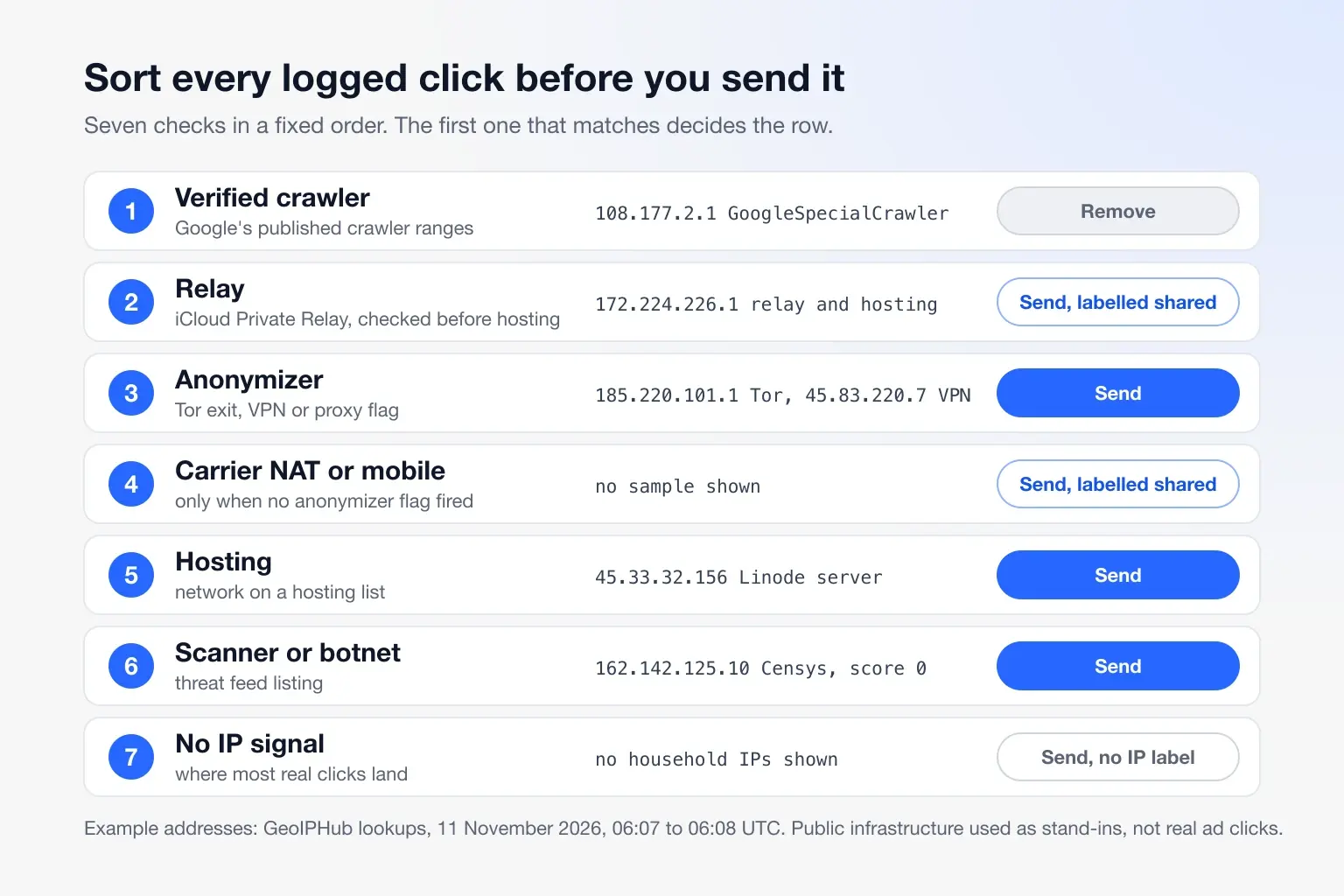
Sort the clicks first: Google's crawlers out, relays before hosting
Sort each row into one bucket in a fixed order: some addresses carry two labels, and the first match decides. Google's verified crawlers come out first. Relays come before anonymizers and hosting: one Private Relay egress carries many Apple users, and some read as hosting.
export function bucket(lookup) {
  if (!lookup) return "not_looked_up";
  const d = lookup.detection ?? {};
  const t = lookup.threat ?? {};
  if (t.crawler?.verified === true) return "verified_crawler";
  if (d.is_relay === true) return "shared";
  if (d.is_tor === true || d.is_vpn === true || d.is_proxy === true) return "anonymizer";
  if (t.is_cgnat === true || d.is_mobile === true) return "shared";
  if (d.is_hosting === true) return "hosting";
  if (t.is_scanner === true || t.is_botnet === true) return "scanner_or_botnet";
  return "no_ip_signal";
}
On 11 November 2026 it passed all 17 of our tests under Node 24.20.0: nine live lookups from that morning (the six below and three more) and eight edge cases.
The six addresses below are public infrastructure we use as stand-ins; none clicked an ad of ours. Looked up 06:07 to 06:08 UTC, 11 November 2026.
108.177.2.1
- What it is: an address in
108.177.2.0/27of Google'sspecial-crawlers.json(272 prefixes, created 10 November 2026), the range file for AdsBot and Google's other special-case crawlers; AdsBot fetches landing pages to check ad quality. - Lookup:
crawler.verified: true,operator: "Google",name: "GoogleSpecialCrawler", score 0,allow. - Bucket and pack:
verified_crawler, removed. The name is the file's label, not the bot's, so sort onverifiedandoperator, nevername.
172.224.226.1
- What it is: an iCloud Private Relay egress on Akamai.
- Lookup:
is_relay: true,relay_provider: "iCloud Private Relay", and alsois_hosting: true, score 24,allow. - Bucket and pack:
shared, sent labelled, never argued. It is the same relay address in our exclusion-limit post.
185.220.101.1
- What it is: a Tor exit.
- Lookup: AS60729,
is_tor: true, score 100,block. - Bucket and pack:
anonymizer, sent. The strongest row: a reviewer can check it against the Tor Project's exit list (how Tor detection works).
45.83.220.7
- What it is: an address on a network registered to Mullvad VPN's operator.
- Lookup:
is_vpn: true,vpn_provider: "Mullvad (31173 Services)", score 70,step_up. - Bucket and pack:
anonymizer, sent. The flag decides the bucket, not the score. A VPN click alone isn't invalid; many no-conversion clicks from one VPN network is a pattern.
45.33.32.156
- What it is:
scanme.nmap.org, a Linode server. - Lookup: AS63949,
is_hosting: true, score 10,allow. - Bucket and pack:
hosting, sent. A datacenter IP alone isn't fraud, but no-conversion clicks from cloud servers are a pattern.
162.142.125.10
- What it is: a Censys internet scanner.
- Lookup:
is_scanner: true,is_hosting: false, score 0,allow,detection_methods: []. - Bucket and pack:
scanner_or_botnet, sent. A score filter passes it; read the flag.
Most real clicks land in no_ip_signal; we don't publish household addresses, so none is shown.
Send facts Google can check, not a fraud score
Google says it "cannot evaluate third-party reports because Google doesn’t know their detection criteria", so send each label with its public source and drop our score.
The sent file drops fraud_score, recommended_action, detection_methods and every verified_crawler row; every other row keeps its evidence_source and lookup_time_utc. The sources we write:
- Relay: "Apple's published iCloud Private Relay egress list".
- Tor: "Tor Project exit list" (GeoIPHub refreshes it every 6 hours).
- VPN: "VPN provider server lists and a public third-party list", or "network registered to a VPN operator" for 45.83.220.7.
- Hosting: the registered network owner from
network_org, which any registry lookup confirms. - Scanner: the registered network owner, such as "CENSYS-ARIN-01 - Censys, Inc." for 162.142.125.10, not our feed listing.
The Tor click traced to the end: its lookup at 06:07:49 UTC (trimmed), then the working row and the sent row (illustrative click, real lookup):
{
  "ip": "185.220.101.1",
  "asn": { "asn": 60729, "org": "TORSERVERS-NET - Stiftung Erneuerbare Freiheit", "connection_type": "datacenter" },
  "detection": { "is_hosting": true, "is_vpn": false, "vpn_provider": "none", "is_proxy": false, "is_tor": true, "is_relay": false, "relay_provider": "none", "is_mobile": false },
  "threat": { "is_cgnat": false, "is_scanner": false, "is_botnet": false, "crawler": { "verified": false, "operator": "none" } },
  "scoring": { "fraud_score": 100, "recommended_action": "block", "detection_methods": ["tor_exit", "datacenter_blocklisted", "no_ptr_datacenter", "known_spammer"] }
}
<click time>,<gclid>,gclid,<campaign>,<ad group>,<keyword>,185.220.101.1,<user agent>,<device>,<converted>,<lead outcome>,60729,"TORSERVERS-NET - Stiftung Erneuerbare Freiheit",datacenter,true,false,none,false,true,false,none,false,false,false,false,false,none,anonymizer,Tor Project exit list,2026-11-11T06:07:49Z,100,block,"tor_exit;datacenter_blocklisted;no_ptr_datacenter;known_spammer"
<click time>,<gclid>,gclid,<campaign>,<ad group>,<keyword>,185.220.101.1,<user agent>,<device>,<converted>,<lead outcome>,60729,"TORSERVERS-NET - Stiftung Erneuerbare Freiheit",datacenter,true,false,none,false,true,false,none,false,false,false,false,false,none,anonymizer,Tor Project exit list,2026-11-11T06:07:49Z
The rows feed Google's trend indicator; fill in your own counts, never estimates:
Between <start date> and <end date>, <n> of <m> paid clicks on <campaign> came from a Tor exit (<n>), VPN networks (<n>) or hosting networks (<n>), and none converted. Each row in the attached file gives the GCLID, click time, IP, network and the public source of each label, looked up at the time shown. We removed <n> rows from Google's published crawler ranges and labelled <n> shared addresses without counting them.
If you use a click-fraud tool, including ClickFortify, which we build on GeoIPHub, export its per-click fields, not its verdict.
After you file: what comes back, and why it can be nothing
Google emails its findings after an investigation that "typically takes several business days", with any credit for traffic its filters missed. It won't say which clicks it judged: "an investigation won’t be able to confirm if specific clicks were marked as valid or invalid."
Why a request can come back with nothing, from Google's own pages:
- Google had already filtered those clicks before billing.
- The activity is older than 60 days.
- The case rests on repeat or shared IP addresses.
- The evidence is a third-party score Google can't evaluate.
We found no approval rate on Google's pages, so we cite none. An IP can't show intent, a click farm on real phones, or a residential proxy we haven't observed. GeoIPHub does not classify invalid traffic and holds no MRC accreditation; Google decides. IP exclusions are a separate prevention tool, not part of the credit process.
Open the Invalid clicks column and the Invalid Activity Credit Report first. If a pattern is left, pull the last 60 days of your landing-page log, look up each unique IP in the IP lookup tool or the API, sort the rows, and send Google the facts it can check.
Frequently Asked Questions
Is a Google Ads invalid click credit a refund?
No. Google doesn't bill invalid clicks it catches before the invoice, and credits the ones it finds later as a billing adjustment labelled "Invalid activity". Google's refund page ties a refund of account credit to cancelling the account.
How far back can I claim invalid clicks?
Google's help page allows an investigation request "for activity within the last 60 days". Google's terms for Australia-based customers also set a claim period of 60 days after the invoice date. The activity window closes first, so file as soon as you see a pattern.
How long does a Google invalid click investigation take?
Google says it "typically takes several business days". You get an email with the findings and any credit for traffic its filters missed.
Does Google tell you which clicks were invalid?
No. Google says an investigation "won’t be able to confirm if specific clicks were marked as valid or invalid". The Invalid Activity Credit Report shows credited clicks per campaign, for Search and Performance Max.
Can a click fraud tool's report get me a Google Ads click fraud refund?
Not on its own. Google says it cannot evaluate third-party reports because it doesn't know their criteria. Send per-click facts with sources, such as a Tor exit, and keep any score, GeoIPHub's included, for sorting.
Are repeat clicks from one IP address proof of invalid clicks?
No. Google notes that offices, universities, coffee shops and mobile carriers put hundreds or thousands of devices behind one address. GeoIPHub's lookup flags iCloud Private Relay and carrier NAT addresses so you can label them as shared.
Which IP facts help an invalid traffic investigation?
Facts a reviewer can check: a Tor exit, a VPN or proxy flag, or a hosting network and its owner, with the lookup time. Remove Google's verified crawlers first. A GeoIPHub lookup returns all of these flags and the network owner; note when you ran it.
The team behind the GeoIPHub API
Written by the GeoIPHub team, the people who build the GeoIPHub IP intelligence API and its scanner. Drafts are prepared with AI assistance and edited by the team; API examples are real lookups against the live API unless labelled illustrative.